
Assistance2.5 - App Store
You'll be able to see results in few seconds.
Publisher Description
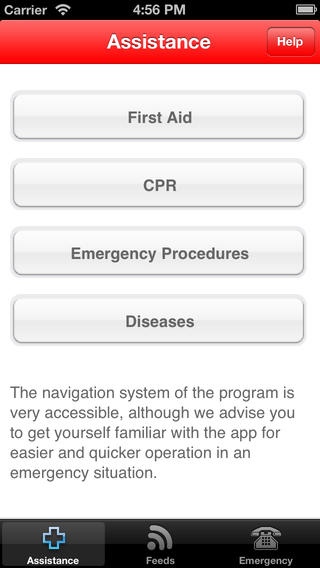
The App Store's first aid app with an interactive assistance is back with a fresh update.
Accidents happens when you don't expect, Assistance allows you to have in your iOS device all the first aid information you need. You can also count with the interactive assistance for a more specific and direct help.
Features:
An interactive assistance that helps the user according the emergency situation
100 illustrations
Uses the device GPS to provide a quick direct phone connection to local emergency numbers
Integrates Feeds from WHO - World Health Organization
More than 200 situations are described:
First Aid:
- Chocking
- Shock
- Bleeding
- Intoxication
- Trauma
- Asthma Attack
- Electrocution
- Myocardial infarction
- Cerebral hemorrhage
- Sting poisoning
- Drowning
- Sunstroke
and more
Procedures:
- Recovery Position
- Recovery Position for infants with less than 1 year
- CPR
- CPR for Infants with less than 1 year
_ CPR for Infants with more than 1 year
- Rautek's Key
- Helmet Removal
- How to evaluate and open the airway
- What to say when calling the emergency number
- Transporting the victim
Diseases:
- Childhood diseases
- Vaccines schedule
- Common infant problems
Attention:
Never forget that the provision of first aid does not exclude the importance of a doctor.
All information related with diseases is for educational purposes only. For proper diagnoses and treatment consult your physician.
IF THE APPLICATION DOES NOT LOAD OR FROZE PLEASE TRY TO ERASE IT AND REINSTALL IT AGAIN
PLEASE REMEMBER WE CANNOT DIRECTLY REPLY TO QUESTIONS OR ISSUES POSTED IN APP STORE REVIEWS
Fell free to give us your feedback and suggestions to support@assistanceapp.com
Requires iOS 4.3 or later. Compatible with iPhone, iPad, and iPod touch.
About Assistance
The company that develops Assistance is Nuno Pereira. The latest version released by its developer is 2.5.
To install Assistance on your iOS device, just click the green Continue To App button above to start the installation process. The app is listed on our website since 2009-05-02 and was downloaded 0 times. We have already checked if the download link is safe, however for your own protection we recommend that you scan the downloaded app with your antivirus. Your antivirus may detect the Assistance as malware if the download link is broken.
How to install Assistance on your iOS device:
- Click on the Continue To App button on our website. This will redirect you to the App Store.
- Once the Assistance is shown in the iTunes listing of your iOS device, you can start its download and installation. Tap on the GET button to the right of the app to start downloading it.
- If you are not logged-in the iOS appstore app, you'll be prompted for your your Apple ID and/or password.
- After Assistance is downloaded, you'll see an INSTALL button to the right. Tap on it to start the actual installation of the iOS app.
- Once installation is finished you can tap on the OPEN button to start it. Its icon will also be added to your device home screen.
Program Details
System requirements
Download information
Pricing
Version History
version 2.5
posted on 2009-05-02
Disclaimer
Official App Store Link
We do not host Assistance on our servers. We did not scan it for viruses, adware, spyware or other type of malware. This app is hosted by Apple and passed their terms and conditions to be listed there. We recommend caution when installing it.
The App Store link for Assistance is provided to you by apps112.com without any warranties, representations or guarantees of any kind, so access it at your own risk.
If you have questions regarding this particular app contact the publisher directly. For questions about the functionalities of apps112.com contact us.
